The board
Jobs is where you’ll spend most of your time. It shows every live job your company holds, sorted into four columns by what needs to happen next.
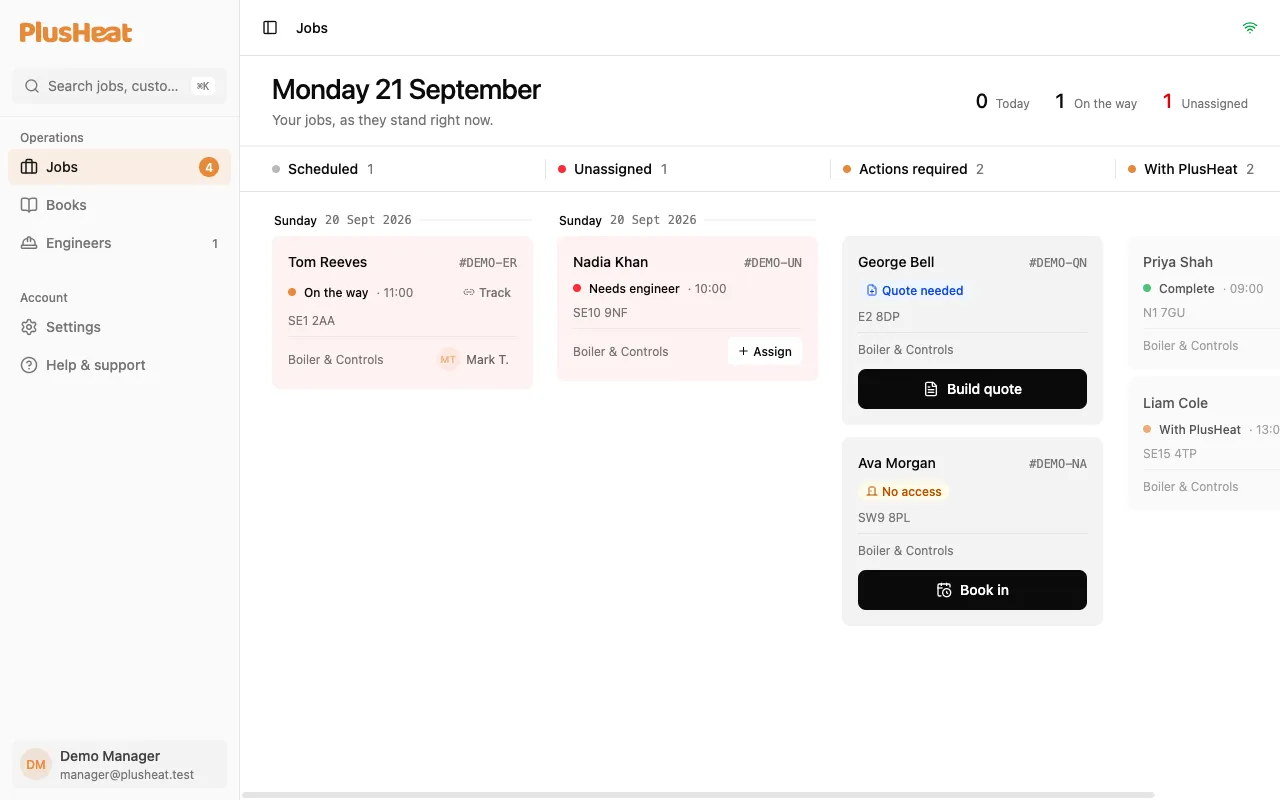
The four columns
Section titled “The four columns”| Column | What’s in it | What you do |
|---|---|---|
| Scheduled | Jobs with a date and an engineer. Grouped by day. | Nothing — they’re on track. Watch the status dot. |
| Unassigned | Jobs you’ve accepted that have a date but no engineer yet. | Assign someone. See Assigning an engineer. |
| Actions required | Jobs waiting on you: a quote to build, a no-access to rebook, an approved quote to schedule. Each card has one button. | Press the button. |
| With PlusHeat | Jobs that have gone back to PlusHeat — a report filed, a quote submitted, a certificate issued. | Nothing. They come back to you if they need to. |
Reading a card
Section titled “Reading a card”Every card has the same parts:
- Customer name and the job number (
#…). The number is what to quote to support. - A status with a coloured dot, and the booked time.
- The postcode.
- The category — Boiler & Controls, Central Heating, Plumbing, Gas Safety.
- Where there’s someone on it, the engineer’s initials and name.
Tap a card to open the full job: the customer’s details, the map, the timeline, any reports and quotes.
The top line
Section titled “The top line”The header shows today’s count, how many engineers are on the way right now, and how many jobs are unassigned. Red means it needs you.
Searching
Section titled “Searching”⌘K (or the search box top-left) finds any job, report or purchase order by its job number.
On a phone
Section titled “On a phone”The same four columns become four tabs across the top. Swipe, or tap a tab. The bar at the bottom moves between Jobs, Books, Engineers and Settings.